Greetings!
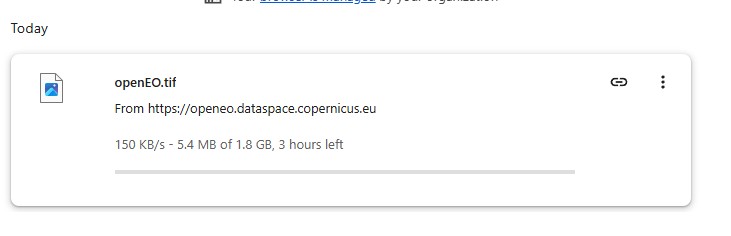
I am generating and downloading Sentinel 2 images using the OpenEO web editor. Been using it for months. For the past couple of days, I am constantly getting failed, partial downloads. The image generates correctly online, but I cannot get it to my computer.
Do you know what could be the issue and how to sort it out?
Any help is greatly appreciated.
Michel
Hi, can you share a job-id of a failed attempt? It is formatted like j-26xxxxxxxxxxxxxxxxxxxxxxxxxxxxxx. Or the process graph and backend you used.
Emile Sonneveld
Hi Emile,
j-26043004191642f6a402815404993f88 and j-2604291846434f998f0ad4772da8dc98.
The two of them finish correctly (appear as “finished”) but downloading takes ages and then fails.
Michel
Hi Michel,
When the download fails in the web editor: can you describe in more detail how it fails? Do you get some kind error message/popup, or does it just stop silently? You also mention partial downloads: do you know the file size of what is actually downloaded?
Have you tried to download the job results with another client, e.g. the openeo Python client if you are familiar with that? For example:
connection = openeo.connect(
    url="https://openeo.dataspace.copernicus.eu/",
).authenticate_oidc()

job = connection.job("j-26043004191642f6a402815404993f88")
job.get_results().download_files(job.job_id)
Also note that you seem to be using the Copernicus Data Space Ecosystem (CDSE) openeo backend openeo.dataspace.copernicus.eu. This forum is for the openEO Platform backend (openeo.cloud). openEO at CDSE has its own forum at openEO - Copernicus Data Space Ecosystem | Community forum
Dear Stefaan,
Thank you for your reply. I am attaching two images that show what happens. It downloads at a very low speed and then it stops. I have tried to download these at home and at work, and on a windows and mac computer and it doesn’t change at all.
I didn’t realise that the forum was different. Should I raise the query there again?
Michel
Do you have the actual URL of the asset that is being downloaded here?
Thanks for sharing that link.
Downloading seems to work fine from our end however. A colleague and I (working from different locations) managed to download the file. We both used command line curl (on linux).
Based on the screenshot you shared, I assume you only tried to download with a standard web browser, is that correct? Have you tried other download tools as well? For example the openeo python client package (as illustrated above), some kind of download manager, command line tools like curl, …?
I was initially downloading them through the web browser but then I tried doing it with RStudio. It failed there as well. Can you help me with a command that I can use in MacOS/bash?
I basically used something like this:
curl -o openEO.tif 'https://s3.waw3-1.openeo.v1.dataspace.copernicus.eu/openeo-data-prod-waw4-1/batch_jobs/j-26043004191642f6a402815404993f88/openEO.tif?X-Proxy-Head-As-Get=true&X-Amz-Algorithm=AW....'
Note that the quotes around the URL are quite important, as the URL contains ampersand characters, which will trip up bash unless properly quoted or escaped
and additionally, some extra options to resume a partial download (-C -) and increase verbosity (-v):
curl -C - -v -o openEO.tif 'https://s3.waw3-1.openeo.v1.dataspace.copernicus.eu/openeo-data-prod-waw4-1/batch_jobs/j-26043004191642f6a402815404993f88/openEO.tif?X-Proxy-Head-As-Get=true&X-Amz-Algorithm=AW....'